
Amazon Brand Registry is one of the most valuable programmes for brand owners. It helps protect your listings, gives you more control over your product pages and unlocks tools such as A+ Content, Sponsored Brands ads and a Brand Store. If you’re wondering how to apply for Amazon Brand Registry, this guide walks you through the requirements, the information to prepare and the enrolment steps, plus the common mistakes that cause applications to be rejected.
What Is Amazon Brand Registry?
Brand Registry is Amazon’s programme for brand owners. Once your brand is enrolled, Amazon recognises you as the rights owner, which gives you more influence over the content on listings for your brand. It’s free to enrol.
Key benefits include:
- Greater control over your product detail pages
- Access to A+ Content and Brand Story to enhance listings
- Sponsored Brands and other brand advertising options
- A Brand Store, a multi-page storefront on Amazon
- Brand Analytics data (where available)
- Tools to search for and report potential infringement of your intellectual property
Brand Registry Requirements
1. An eligible trademark
Your brand must have an active registered trademark or a pending trademark application from an eligible government trademark office. Commonly used offices include the USPTO in the United States, the UKIPO in the UK and the EUIPO in the European Union, among many others. Check Amazon’s list for the marketplaces you sell in.
Amazon accepts two types of trademark:
- Word marks: text only, such as your brand name.
- Design marks: images that include words, letters or numbers, such as a logo containing your brand name.
2. Permanent branding on products or packaging
Your brand name must be permanently affixed to your products or packaging. That means printed, sewn, etched, engraved or moulded on. Stickers, removable labels and hang tags aren’t accepted as permanent branding.
3. The right person applying
The application must be submitted by the trademark owner, or someone authorised to act for them. Amazon may send a verification code to the contact listed on the trademark record, so make sure that person knows to expect it.
Don’t Have a Trademark Yet?
You can still get started. Amazon’s IP Accelerator programme connects brands with vetted IP law firms that can file a trademark application. Brands that file through IP Accelerator can often access Brand Registry benefits while their application is pending, instead of waiting for full registration, which can take many months.
Always take proper legal advice on your trademark filing, as the brand name and class choices matter.
What to Prepare Before You Apply
Gather this information before you start, so the application goes smoothly:
- Brand name exactly as it appears on your trademark record (spacing and symbols must match)
- Logo image if your trademark is a design mark, matching the record exactly
- Trademark registration or application number in the format the trademark office uses
- Product categories your brand sells in
- Photos of your product or packaging showing the brand name permanently affixed (real photos, not mock-ups or edited images)
- Distribution details, such as whether you manufacture, sell to distributors or sell direct, and your brand website if you have one
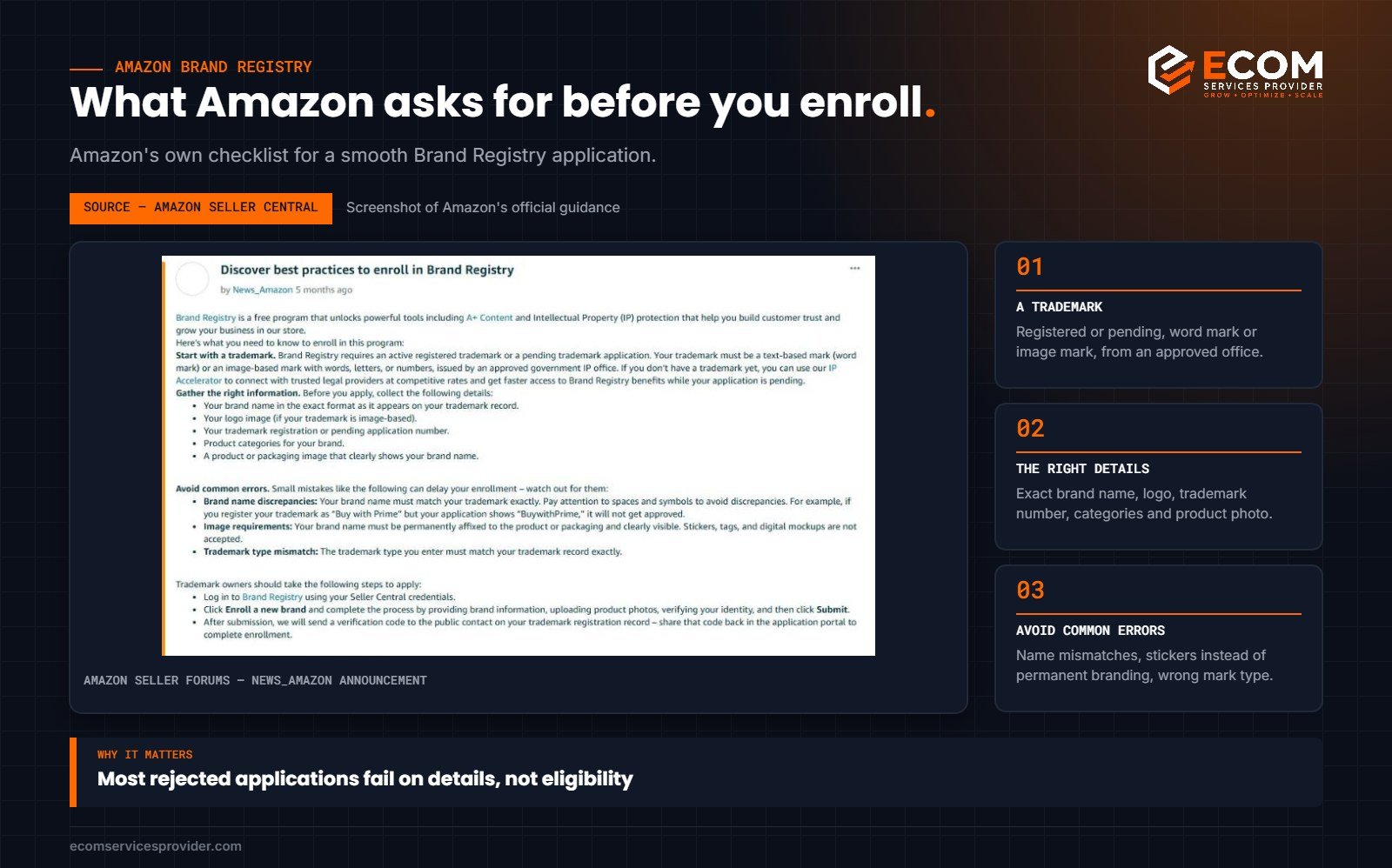
How we do it at ECOM Services Provider: before submitting any application we check the brand name character by character against the trademark record and review the product photos for permanent branding, the two issues behind most rejections we see.
How to Apply for Amazon Brand Registry: Step by Step
Step 1: Sign in to Brand Registry
Go to Amazon Brand Services and sign in using your Seller Central or Vendor Central credentials. Using the same login links your brand to your selling account.
Step 2: Start the enrolment
Select the option to enrol a new brand. Read through the checklist Amazon provides to confirm you have everything ready.
Step 3: Enter your brand and trademark details
Enter your brand name and trademark number, select the trademark office and choose the mark type (word mark or design mark). If you have a design mark, upload the logo image exactly as registered.
Step 4: Add product and selling information
Add your product categories and upload clear photos of your branded products or packaging. Provide the requested information about how you sell and distribute your products.
Step 5: Submit and complete verification
Submit your application. Amazon will usually contact the trademark’s listed correspondent (often your trademark attorney) with a verification code. Once you receive it, enter it in Brand Registry to complete the process.
Step 6: Watch for approval
Approval timelines vary. Keep an eye on your email and the Brand Registry case log for questions from Amazon. Once approved, your new tools will start appearing in Seller Central.
You’ll find Amazon’s official requirements on the Brand Registry requirements page.
Common Reasons Applications Are Rejected
- Brand name mismatch. The brand name in your application must match the trademark record. Differences in spacing or symbols can cause rejection, although capitalisation differences are generally accepted.
- Non-permanent branding. Product photos showing stickers or removable labels won’t pass.
- Edited or mock-up images. Amazon wants real photos of real products and packaging.
- Wrong mark type. Selecting “word mark” when your trademark is a design mark (or the other way round) can lead to rejection.
- Uploading the whole certificate. For design marks, upload only the exact logo image, not the full trademark document.
- Verification code not received. If your attorney or the listed contact doesn’t pass on the code, the application can stall.
How Brand Registry Helps Protect Your Listings
One of the main reasons brands enrol is protection. Without Brand Registry, other sellers can sometimes change details on listings for your products, or list items that misuse your brand name, and you have limited tools to respond. Once enrolled, you have stronger influence over the content shown on your product pages, so updates you submit as the brand owner carry more weight.
Brand Registry also gives you search and reporting tools. You can search Amazon for listings that may infringe your trademark, copyright or design, and report them through a dedicated form rather than general seller support. Amazon also uses the information brands provide to run its own automated protections, which aim to stop suspected bad listings before they go live. None of this replaces your own monitoring, but it makes protecting your brand far more manageable.
What to Do After You’re Approved
Once enrolled, make the most of what Brand Registry offers:
- Add a Brand Story across your listings.
- Create A+ Content for your key products. Our guide on Premium A+ vs Standard A+ explains the options.
- Build a Brand Store that showcases your full range. See our Amazon Storefront design service.
- Launch Sponsored Brands campaigns to increase brand visibility.
- Use the protection tools to monitor and report listings that may infringe your intellectual property.
Frequently Asked Questions
How much does Amazon Brand Registry cost?
Enrolling in Brand Registry is free. Costs come from obtaining your trademark, such as filing fees and legal fees.
Can I enrol with a pending trademark?
Yes. Amazon accepts pending trademark applications from eligible offices, and the IP Accelerator programme can help brands get earlier access while their application is pending.
How long does Brand Registry approval take?
It varies. Many applications are processed within days once verification is complete, but issues with documents or the verification code can extend the timeline.
Can I register a brand I don’t own?
No. Only the trademark owner, or someone authorised by them, can enrol a brand. Resellers can’t enrol brands they don’t own.
Get Help With Brand Registry
ECOM Services Provider has supported brands with Brand Registry, A+ Content and storefronts across Amazon marketplaces worldwide, drawing on 8+ years of experience and 768+ completed projects. See our Amazon Brand Registry service or book a free consultation to talk through your brand.