
Your Amazon seller account is the foundation of your business. If its health slips too far, Amazon can restrict or deactivate it, cutting off sales overnight. The Amazon Account Health Rating (AHR) is Amazon’s way of summarising how well your account follows its policies, and keeping an eye on it is one of the simplest ways to protect your business.
This guide explains how the rating works, what affects it, the performance targets behind it, and practical steps to keep your account healthy.
What Is the Amazon Account Health Rating?
The Account Health Rating is a score shown on the Account Health dashboard in Seller Central. It reflects how well your account complies with Amazon’s selling policies. Amazon uses it to show at a glance whether your account is at risk of deactivation.
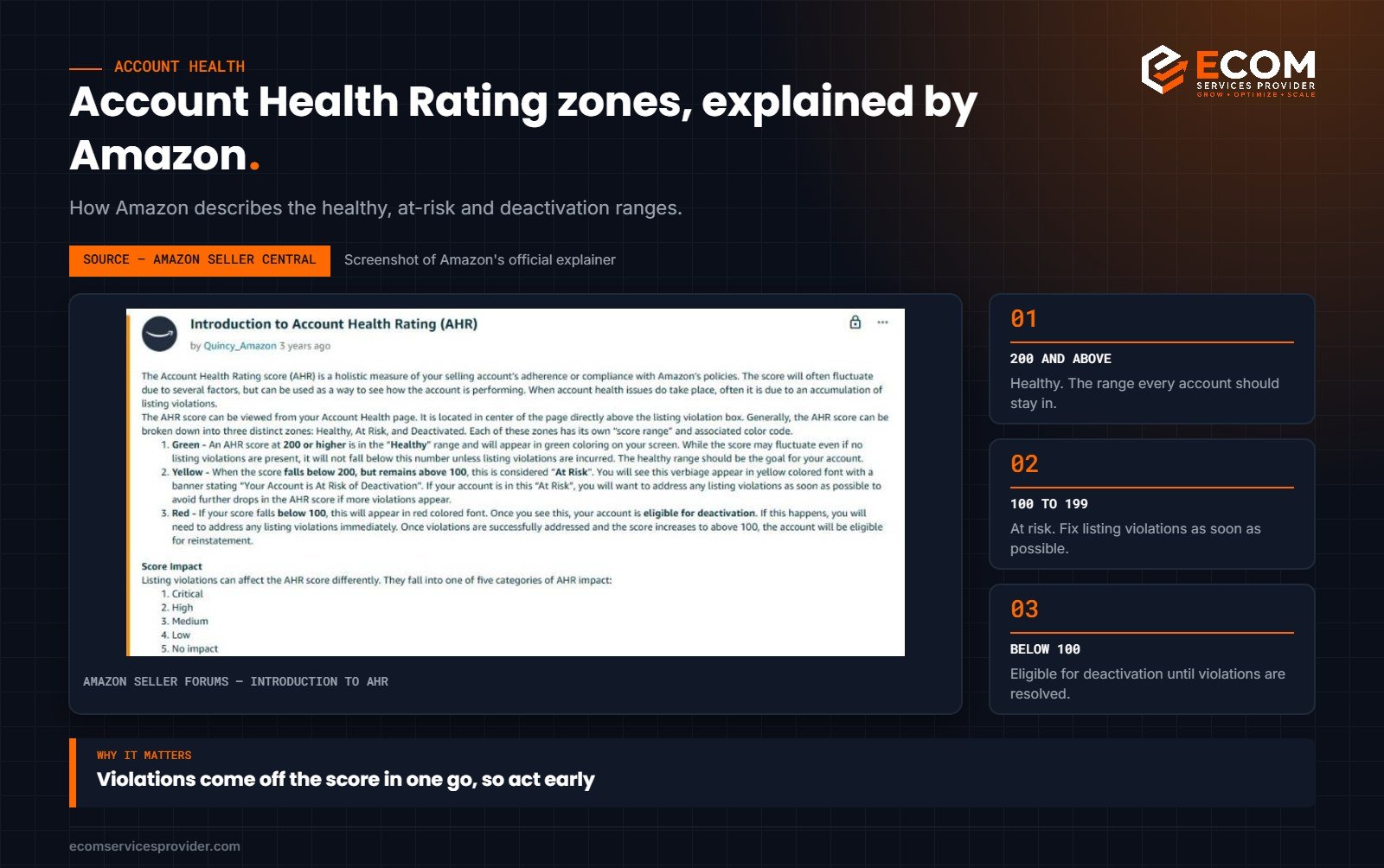
The rating runs from 0 to 1,000 and is grouped into three bands:
- 200 to 1,000 – Healthy. Your account is in good standing.
- 100 to 199 – At risk. Your account could be deactivated if issues aren’t fixed.
- 0 to 99 – Unhealthy. Your account may be deactivated.
Many sellers aim to stay well above 200, so that a single issue doesn’t push them into the at-risk zone.
How we do it at ECOM Services Provider: when we manage an account, the Account Health dashboard is the first thing we check each week. Every new notification gets a response plan the same day, because the sooner a violation is resolved, the sooner its points come back.
What Affects Your Account Health Rating?
The AHR focuses mainly on policy compliance. Unresolved policy violations reduce your score, and the impact depends on how serious the violation is. Common areas include:
- Intellectual property complaints such as trademark, copyright or patent claims
- Product authenticity complaints from customers
- Product condition and safety issues
- Listing policy violations, such as restricted products or incorrect information
- Restricted products policy violations
- Customer product reviews policy violations (for example, incentivised reviews)
- Food and product safety issues
Resolving violations, for example by successfully appealing them or correcting the issue, can restore points.
The Performance Metrics Behind Account Health
Alongside the rating, Amazon tracks performance metrics that also appear on your Account Health dashboard. Falling below these targets can lead to warnings or restrictions:
- Order Defect Rate (ODR): the percentage of orders with negative feedback, an A-to-z Guarantee claim or a credit card chargeback. Amazon’s target is under 1%.
- Late Shipment Rate: for orders you ship yourself, the share confirmed as shipped after the expected date. The target is under 4%.
- Pre-fulfilment Cancel Rate: the share of seller-fulfilled orders you cancel before shipping. The target is under 2.5%.
- Valid Tracking Rate: the share of seller-fulfilled shipments with valid tracking. The target is above 95%.
If you use FBA, Amazon handles shipping, so shipping metrics mainly apply to your seller-fulfilled orders. ODR and policy compliance apply to everyone.
How to Keep Your Account Health Strong
1. Check the dashboard every week
Make a habit of reviewing the Account Health dashboard. Catching an issue early gives you more time to respond, and some notifications come with deadlines.
2. Respond to every notification quickly
When Amazon flags a violation, read it carefully and respond. If the claim is valid, fix the issue. If you believe it’s wrong, submit a clear appeal with supporting evidence such as invoices, authorisation letters or product documentation.
3. Source from legitimate suppliers
Authenticity complaints are among the most damaging. Buy from the manufacturer or authorised distributors and keep invoices that show the supply chain.
4. Keep listings accurate
Make sure titles, images and descriptions match the product exactly, including size, colour and quantity. Mismatches lead to returns, negative feedback and “not as described” complaints. Our Amazon listing optimization service includes checks for accuracy and compliance.
5. Avoid restricted claims
Remove medical claims, unsupported “eco” claims and other wording that could break policy. Check category requirements before listing anything that might be gated or restricted.
6. Handle customer issues before they escalate
Answer buyer messages promptly, typically within 24 hours, and resolve problems before they turn into negative feedback or A-to-z claims.
7. Ship on time with valid tracking
For seller-fulfilled orders, set realistic handling times, confirm shipments promptly and always upload valid tracking numbers.
8. Keep your documents up to date
Make sure business information, tax details and any required compliance documents are current. Expired or missing documents can trigger verification holds.
A Simple Weekly Account Health Routine
Good account health comes from habits rather than one-off fixes. A short weekly routine is often enough for small and mid-sized sellers:
- Monday – Dashboard check. Open the Account Health dashboard. Note your rating, any new policy notifications and any metric that has moved closer to its target.
- Mid-week – Customer review. Go through buyer messages, negative feedback, returns comments and any A-to-z claims. Reply, resolve and look for repeated complaints that point to a listing or product problem.
- Thursday – Listing check. Review your top listings for accuracy. Confirm that titles, images and variations still match the product, and that nothing has been changed unexpectedly.
- Friday – Inventory and supply check. Confirm that new stock comes from approved suppliers with invoices on file, and that FBA shipments meet prep requirements.
Keep a simple log of what you checked and any actions taken. If Amazon ever asks for a plan of action, a record of your routine and the steps you took helps show that you manage the account responsibly. It also makes it easier to spot patterns, such as a supplier whose stock keeps attracting complaints, before they become serious.
If you sell in several marketplaces, check each one. Account health is shown per marketplace region, and an issue in one region can still affect your wider selling account.
What to Do If Your Rating Drops
- Don’t panic, but act quickly. Identify which violations caused the drop on the dashboard.
- Investigate the root cause. Was it a supplier issue, a listing error or a customer complaint?
- Fix the issue before appealing, for example by correcting the listing or removing affected stock.
- Write a clear plan of action if asked: explain the cause, what you’ve done to fix it and what you’ll do to prevent it happening again.
- Monitor closely until the rating recovers.
You can find Amazon’s guidance in Seller Central Help under Account Health. For prep rules that help avoid shipment problems, see our guide to Amazon FBA prep requirements.
Frequently Asked Questions
What is a good Amazon Account Health Rating?
Any score of 200 or above is “Healthy”. Many sellers aim for a higher score to give themselves a buffer against new issues.
Does Account Health affect the Buy Box?
Account health and seller performance are part of how Amazon assesses sellers, so keeping your account in good standing supports your ability to win the Buy Box.
Can FBA sellers have poor account health?
Yes. Even though Amazon ships FBA orders, policy violations, authenticity complaints and order defects (such as negative feedback) still count against you.
How long do violations affect my rating?
It depends on the violation. Many are considered over a set period, and resolving or successfully appealing a violation can restore your rating sooner.
Want Help Protecting Your Account?
ECOM Services Provider has 8+ years of Amazon experience and has completed 768+ projects for sellers in marketplaces worldwide. Our Amazon account management service keeps an eye on account health, listings and compliance, and our Amazon FBA support helps you avoid shipment issues. Book a free consultation to talk through your account.