
On Amazon, shoppers cannot pick a product up, turn it over or try it out. Your images have to do all of that for them. Strong Amazon product images are often the single biggest difference between a listing that converts and one that gets scrolled past, and well-designed infographics can answer questions faster than any bullet point.
This guide covers Amazon’s core image requirements, how to plan a complete image set, and what makes product graphics and infographics work.
Amazon’s Main Image Requirements
The main image is the one shoppers see in search results, so Amazon is strict about it. The core rules for most categories are:
- Pure white background. The background must be pure white (RGB 255, 255, 255).
- Product only. No added text, logos, watermarks, borders or graphics.
- Product fills the frame. The product should occupy most of the image area.
- Accurate representation. Show the actual product being sold, including only what is in the box.
- High resolution. Upload images at least 1,000 pixels on the longest side so shoppers can use zoom.
Some categories have extra rules, such as how clothing must be shown. Always check the style guide for your category before shooting.
Planning a Complete Image Set
Your secondary images have more freedom, and that is where the selling happens. A strong image set usually follows a deliberate order, with each image answering a different shopper question.
1. The main image
Clean, compliant and sharp. It earns the click.
2. The hero benefit image
One clear message: the main reason someone should buy this product, supported by a strong visual.
3. Feature infographics
Two or three images that call out specific features with short labels and icons. Each should focus on one idea.
4. Lifestyle images
Show the product in use, in a realistic setting, so shoppers can picture it in their own life.
5. Dimensions and specifications
A clear image with measurements, weight or compatibility details. This prevents returns caused by wrong expectations.
6. What’s in the box
Everything the shopper receives, laid out clearly.
7. Comparison or trust image
A comparison with your other variants, or details on materials, certifications or care that build confidence.
If your category supports it, add a short product video as well.
What Makes Infographics Work
Infographics are images with text and graphics layered on top. Done well, they are scannable in seconds. Done badly, they are cluttered and unreadable on a phone.
- One message per image. If an infographic tries to say everything, shoppers absorb nothing.
- Short text. Headlines of a few words, supporting labels of one line.
- Mobile-readable type. Test every image at phone size before uploading.
- Visual hierarchy. The most important element should be the most obvious.
- Consistent design. Use the same fonts, colours and icon style across every image.
- Accurate claims only. Avoid unsupported claims, guarantees or comparisons with other brands.
Turning Technical Products Into Clear Visuals
Technical products benefit most from good graphics. An exploded view can show how parts fit together. A labelled close-up can explain a material or mechanism. A use-case strip can show where and how the product is used. These visuals replace paragraphs of specification text and answer questions buyers might otherwise ask before purchasing.
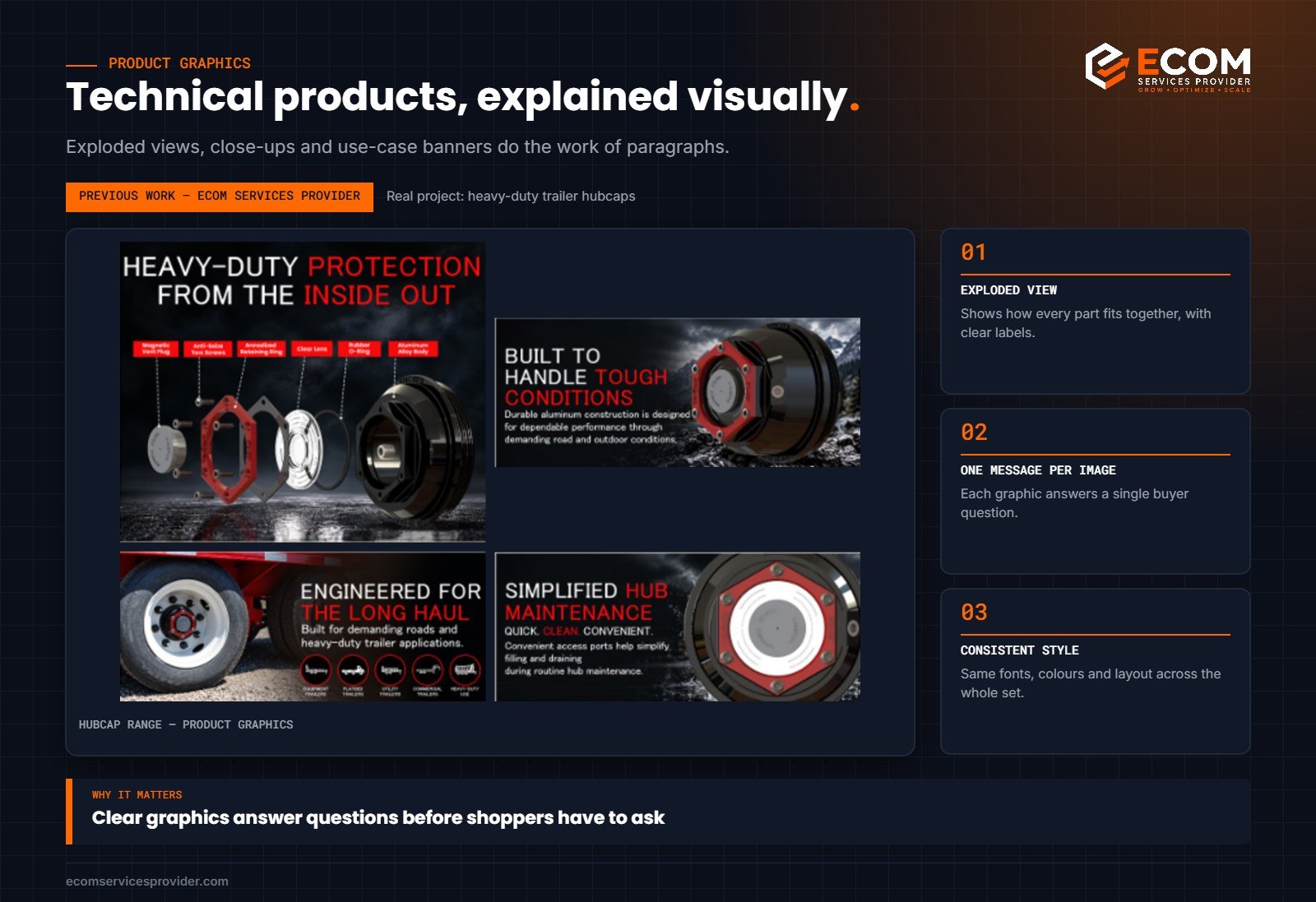
How We Do It at ECOM Services Provider
Every image set we design starts with a plan: one line per image describing the question it answers and the message it carries. Only then do we move into design. The same visual system, colours, fonts and icons, carries through the listing images, A+ Content and Brand Store, so the brand feels consistent wherever a shopper meets it.
Image Briefs: What to Give Your Designer
A good image set starts with a good brief. Before design begins, prepare:
- The image plan: one line per image describing the question it answers and its main message.
- Product photography: clean shots from every important angle, plus close-ups of key features.
- Key facts: dimensions, materials, compatibility and what is included, checked for accuracy.
- Brand guidelines: colours, fonts, logo files and any style examples you like.
- Keyword priorities: the features and terms that matter most for search, so the visuals reinforce the copy.
The clearer the brief, the fewer revisions you need and the more consistent the final set will be.
Testing and Improving Your Images
Images are not finished once they go live. Watch your listing’s conversion rate after uploading a new set, and compare it with the period before. Read new reviews and customer questions: if shoppers keep asking about size, compatibility or what is included, an image should answer that question. Where your account allows, Amazon’s Manage Your Experiments tool can test different main images or other content to see which performs better.
Common Image Mistakes
- Main images with grey or off-white backgrounds
- Text too small to read on mobile
- Several images saying the same thing
- No image showing size or scale
- Lifestyle images that hide the product
- Inconsistent styles that make the listing feel unprofessional
For Amazon’s guidance, see the image requirements in your category style guide in Seller Central and the Sell on Amazon learning resources.
Image Checklist Before You Upload
- Main image on pure white, product only, filling the frame
- Every secondary image answers a different shopper question
- Text readable at phone size, with one message per image
- Dimensions and contents shown clearly
- Colours, fonts and icons consistent across the set
- Claims accurate and supported, with no comparisons to other brands
- Files at least 1,000 pixels on the longest side, named descriptively
Upload the set, then view the listing on a phone exactly as a shopper would. Swipe through every image and check that the order tells a clear story from the first image to the last. If any image feels repetitive or confusing, replace it before you start spending on advertising.
Frequently Asked Questions
How many images should an Amazon listing have?
Use all the image slots available in your category where possible. Each image is another chance to answer a question and move the shopper closer to buying.
Can I add text to my main image?
No. The main image must show only the product on a pure white background. Text and graphics belong in secondary images.
What size should Amazon product images be?
Upload images at least 1,000 pixels on the longest side to enable zoom. Larger, high-quality files give shoppers a better view of details.
Are infographics allowed on Amazon?
Yes, in secondary images. Keep claims accurate and avoid comparisons with other brands.
Want Images That Sell?
ECOM Services Provider has 8+ years of Amazon experience and has completed 768+ projects for brands worldwide. Our product graphics team designs listing images, infographics and A+ visuals, and our listing optimization service makes sure the copy matches. Book a free consultation to see what we can do for your products.