Most shoppers meet your brand one product at a time. An Amazon Brand Store changes that. It gives you a dedicated, multi-page destination on Amazon where shoppers can explore your full range, understand what makes your brand different and move between products without being distracted by competitors. Good Amazon storefront design turns that space into a sales tool rather than a digital brochure.
This guide covers what a Brand Store is, how to structure it, which content blocks work best, and how to measure whether it is doing its job.
What Is an Amazon Brand Store?
A Brand Store is a free, multi-page storefront on Amazon for brands enrolled in Amazon Brand Registry. You build it in Seller Central using templates and content tiles: images, videos, text, product grids and shoppable images. Each Store gets its own Amazon URL, which you can use in Sponsored Brands ads, social media and your own marketing.
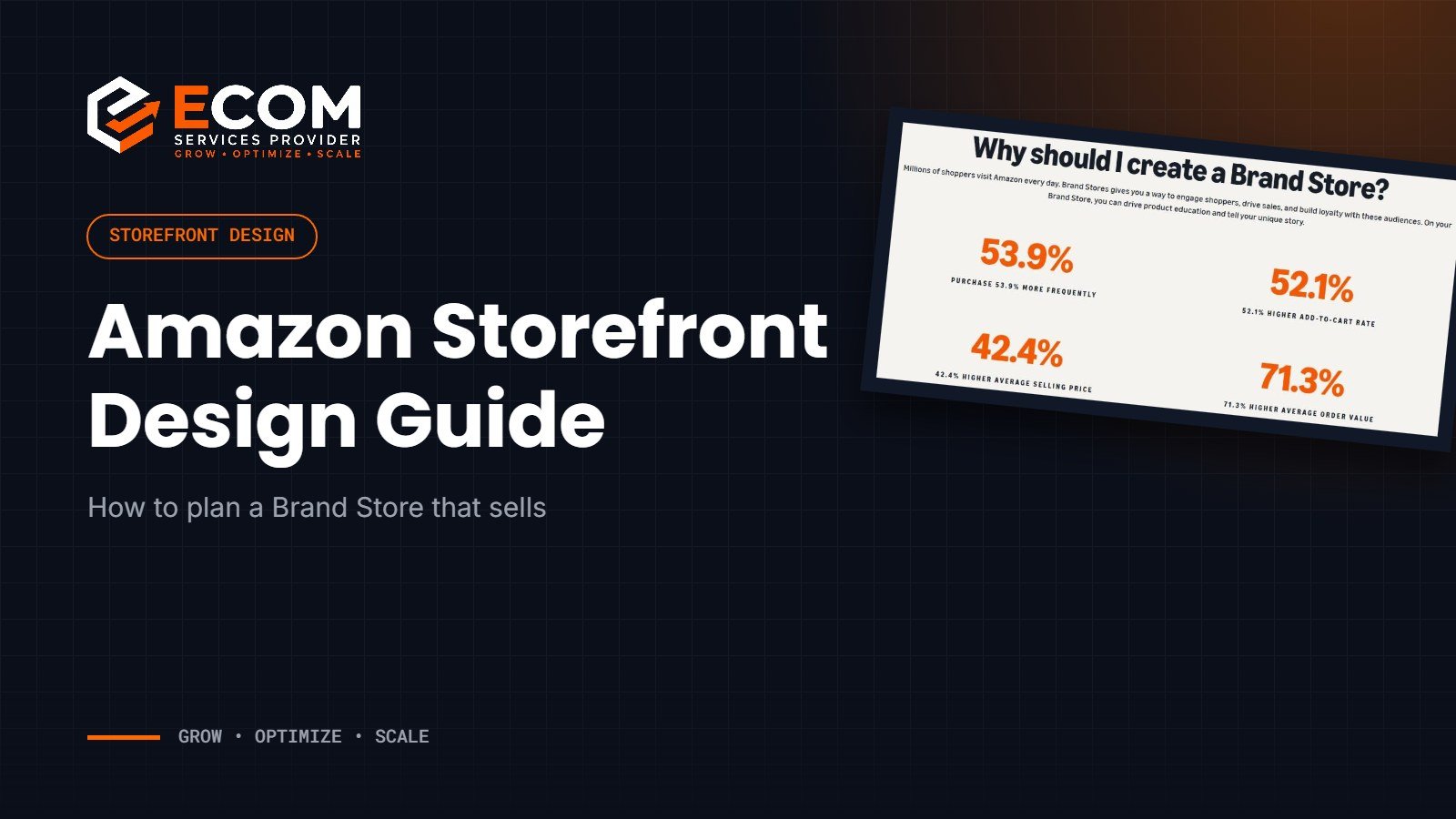
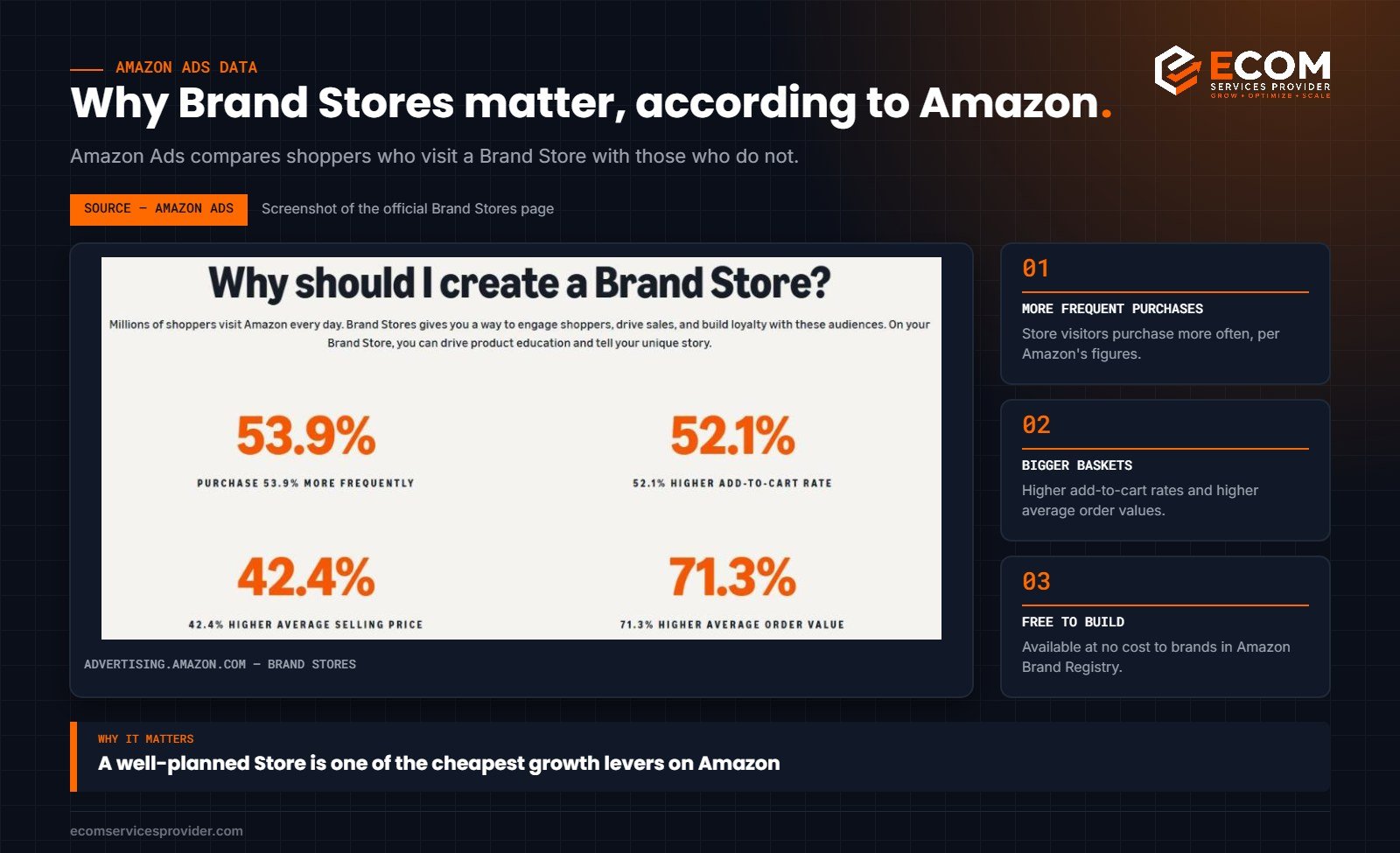
According to Amazon Ads, shoppers who visit a Brand Store during their shopping journey purchase more frequently and show higher add-to-cart rates, higher average selling prices and higher average order values than those who do not. Those are Amazon’s own figures, and they explain why a well-built Store is worth the effort.
Plan the Structure Before You Design
The biggest mistake brands make is jumping straight into design. Start with a site map instead.
Homepage
The homepage should answer three questions within a few seconds: who you are, what you sell and where to go next. A strong homepage usually includes a hero banner with a clear brand message, a short introduction, featured best sellers and clear links to your main categories.
Category pages
Organise pages the way shoppers think, not the way your warehouse is organised. That might be by product type, by use case, by room, by size or by collection. Keep navigation to a manageable number of top-level pages so shoppers are never more than a click or two from a product.
Feature pages
Optional pages can tell your brand story, explain a technology or material, or showcase a seasonal collection. They work best when they always lead back to products.
Content Blocks That Work
- Hero banners: one clear message per banner, with readable text on mobile.
- Product grids: let shoppers browse and add to basket directly from the Store.
- Shoppable images: lifestyle images with tagged products shoppers can click.
- Video: short product demonstrations or brand stories.
- Comparison and “which one is right for me” sections: help shoppers choose between variants.
- Best sellers and new arrivals: keep the Store feeling current.
Use the same colours, typography and photography style throughout. Consistency is what makes a Store feel like a brand rather than a list of products.
Design for Mobile First
Most Amazon shoppers browse on their phones, so design every section with a small screen in mind:
- Keep text inside images short and large enough to read.
- Avoid placing important details at the edges of banners where they may be cropped.
- Check that product grids are easy to scroll and tap.
- Preview every page on mobile before publishing.
Keep the Store Up to Date
A Store that still promotes last season’s products looks neglected. Plan regular updates around launches, seasonal events and key shopping periods. Remove out-of-stock products from featured sections, and refresh hero banners when your campaigns change.
Drive Traffic to Your Store
A Store only works if shoppers visit it. The most common traffic sources are:
- Your brand name link on every product detail page
- Sponsored Brands ads that send shoppers to a Store page
- Links from social media, email and your own website
- The Brand Story section on your listings
Measure Performance With Store Insights
Amazon provides Store Insights in Seller Central, showing visits, page views, sales and traffic sources for your Store. Use it to see which pages hold attention, which traffic sources perform best and where shoppers drop off. Then improve the weakest pages first.
A Simple Store Launch Plan
- Map the pages. List the homepage and every category page, and decide which products sit on each.
- Write the copy. Short headlines and one-line descriptions for each section, written for mobile.
- Prepare the assets. Hero banners, lifestyle images, tile images and any video, all in one consistent style.
- Build in Seller Central. Use the Store builder templates as a starting point, then adjust tiles to fit your plan.
- Preview on mobile and desktop. Fix anything cropped, crowded or hard to read.
- Submit for review. Allow time before important launches or sales events.
- Connect traffic. Point Sponsored Brands campaigns and your external marketing to the right Store pages.
Common Storefront Mistakes
- A homepage with no clear path. If shoppers do not know where to click next, they leave.
- Too many pages. Deep, complicated navigation hides products instead of showcasing them.
- Text-heavy banners. Long sentences inside images become unreadable on phones.
- Inconsistent visuals. Mixing styles from different campaigns makes a brand look disorganised.
- No product grids. Beautiful pages that do not let shoppers buy waste the traffic they receive.
- Set and forget. Out-of-date promotions and out-of-stock products undermine trust.
How We Do It at ECOM Services Provider
We plan every Store around a simple page map before any design starts, so that navigation matches how shoppers search for the products. Designs use the same visual system as the brand’s A+ Content and listing images, so the experience feels consistent from search result to Store. Every page is checked on mobile before it is submitted for review.
For Amazon’s overview of Stores, see Brand Stores on Amazon Ads.
Storefront Checklist Before You Publish
- Every page has a clear purpose and leads to products
- Navigation uses plain labels shoppers recognise
- Hero banners carry one message each and read well on mobile
- Product grids are complete and contain no out-of-stock items
- Images, colours and fonts match your listings and A+ Content
- Links to the Store are ready for your ads and external marketing
- Store Insights is bookmarked so you can review results after launch
Run through this list for every page, not just the homepage. Category pages often receive as much traffic as the homepage, especially from Sponsored Brands ads that point directly to them, so they deserve the same care in layout, imagery and copy.
Frequently Asked Questions
Does an Amazon Brand Store cost anything?
No. Brand Stores are free for brands enrolled in Amazon Brand Registry. Costs come from design, photography and video production.
Do I need Brand Registry to create a Store?
Yes. Brand Stores are available to brands enrolled in Amazon Brand Registry.
How many pages should a Brand Store have?
Enough to make browsing easy, but not so many that shoppers get lost. For most brands, a homepage plus a handful of category pages is a good starting point.
How long does Store approval take?
Amazon reviews Stores before they go live. Approval is often quick, but allow a few days, especially before an important launch.
Want a Store That Sells?
ECOM Services Provider has 8+ years of Amazon experience and has completed 768+ projects for brands across Amazon marketplaces worldwide. Our Amazon Storefront design service covers page planning, design and launch, and pairs well with our A+ Content work. Book a free consultation to discuss your brand.